
What Is Data Roaming? The Ultimate Guide
Data roaming is a handy feature that keeps you online when you’re outside your usual mobile network. It’s also the reason some people come home to a bill that makes them blink twice.
You land in a new country, turn off airplane mode, and—bam—your phone springs back to life. Maps work. Messages send. Social apps refresh. You feel like a travel superhero.
That seamless connection is often powered by data roaming: a handy feature that keeps you online when you’re outside your usual mobile network. It’s also the reason some people come home to a bill that makes them blink twice.
Let’s break it down in a way that’s actually clear, practical, and (yes) a little fun.
Data roaming, explained like a human
Data roaming is when your phone uses mobile data on a network that isn’t your usual provider’s network.
At home: your phone uses your provider’s towers and network.
Away from home (often abroad): your phone can connect to a partner network so you still have internet—even though you’re not on your regular network.
In simple terms:
Roaming = borrowing another network so your phone can keep using the internet.
What roaming lets you do (aka “the stuff you actually care about”)
When data roaming is enabled and working, you can keep using:
Maps and navigation
WhatsApp/iMessage and messaging apps
Email and work tools (Teams/Slack/Zoom)
Ride-hailing apps
Social media
Browsing and online payments
Streaming and uploads (this is where costs can spike)
So yes, roaming can be super convenient. The important part is understanding what it costs and how to control it.
Mobile data vs data roaming vs Wi-Fi (quick clarity)
People mix these up all the time, so here’s the clean version:
Mobile data
Internet from the cellular network (4G/5G) using your usual provider.
Data roaming
Mobile data while connected to a different network because you’re outside your provider’s normal coverage.
Wi-Fi
Internet from a router (hotel, café, home, hotspot device). It’s not cellular data.
Good to know: Turning off data roaming doesn’t turn off Wi-Fi. Wi-Fi still works normally.
International vs domestic roaming
International roaming
This is the common one: you travel abroad and your phone connects to a foreign network.
Domestic roaming
Less common, but it happens: you’re still in your home country, but your phone uses a partner network in an area where your provider has weak coverage.
Most “shock bills” are from international data roaming—especially if you roam without a bundle or pass.
How data roaming works (behind the scenes, without the boring)
Your phone doesn’t just connect randomly. Here’s what’s happening:
You leave your provider’s main coverage area
Usually by crossing a border.Your phone scans for available networks
It finds local carriers in that country.It connects to an approved partner network
Typically the strongest one it can access automatically.Your home provider verifies you’re allowed to roam
This is the “yes, this is a real customer” handshake.You use data normally
Maps, messages, browsing, uploads—everything.Usage is tracked for billing
The visited network reports your usage so your home provider can charge you based on your plan.
That last step is why roaming can cost more: you’re using a network your provider has to pay for.
Why roaming can get expensive (and why it feels sneaky)
Roaming costs vary a lot depending on your plan and destination, but here are the big reasons it can hurt:
1) You might be paying “per MB” without realizing it
If you don’t have a roaming bundle or daily pass, some plans charge by the megabyte. That’s the fastest route to a bill horror story.
2) Background data quietly eats your allowance
Even if you’re “not really using your phone,” your phone might be:
Syncing photos
Refreshing apps
Updating software
Backing up files
Fetching emails constantly
Background activity can burn data without you noticing.
3) Video is a roaming bill’s best friend
Auto-playing videos, video calls, and uploading clips can use a lot of data quickly.
A helpful rule:
If it has a play button, treat it like it’s trying to steal your lunch money.
The biggest “surprise roaming” situations (watch out for these)
Border areas
If you’re near a border, your phone might grab a stronger signal from the neighboring country—even if you didn’t “travel.” Suddenly: roaming.
Ferries and cruises
At sea, phones can connect to special onboard networks that may be far more expensive than normal land-based networks.
Airport/arrival moments
The second you turn off airplane mode, your phone can start syncing and updating. If roaming is on, the meter can start immediately.
Should you keep data roaming ON or OFF?
Keep data roaming ON when…
You know your plan includes roaming, or you’ve activated a roaming add-on
You need reliable connectivity for navigation, work, or emergencies
You have a travel setup intended for international data use
Keep data roaming OFF when…
You don’t have a roaming bundle/pass and don’t want surprises
You’re near a border and want to avoid accidental roaming
You’re on a ship and don’t want premium charges
You’re happy using Wi-Fi only
How to turn data roaming on/off (iPhone + Android)
iPhone
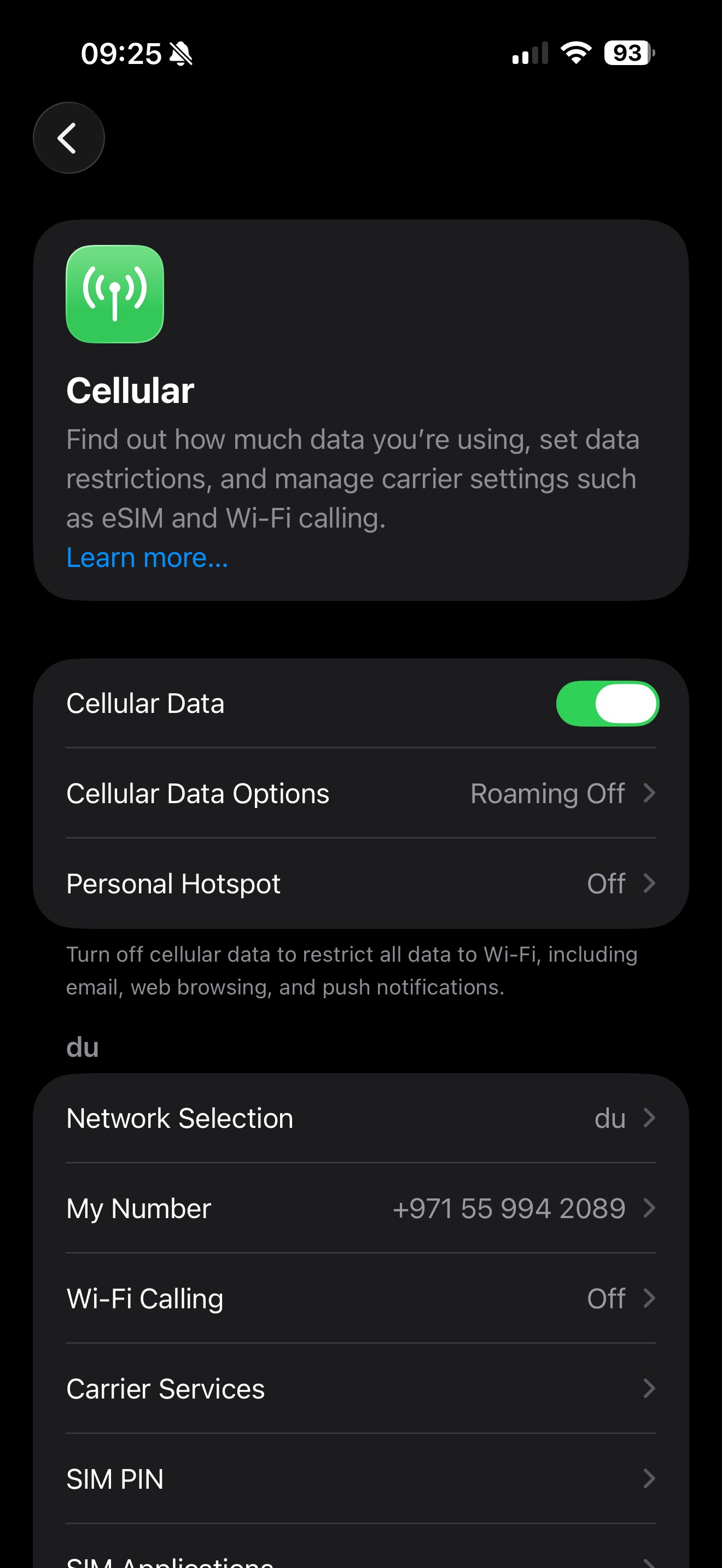
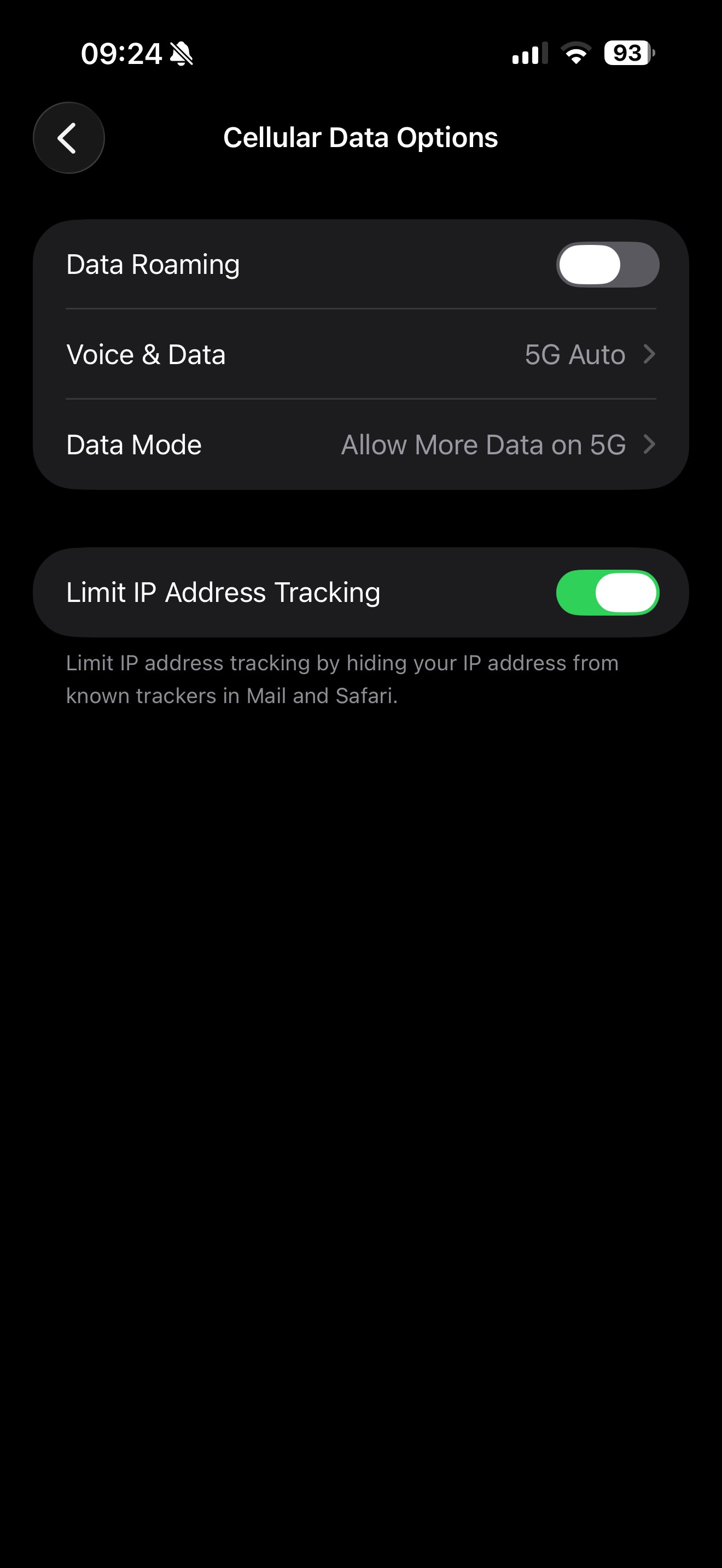
Settings → Cellular/Mobile Data → Cellular Data Options → Data Roaming (toggle)
Android
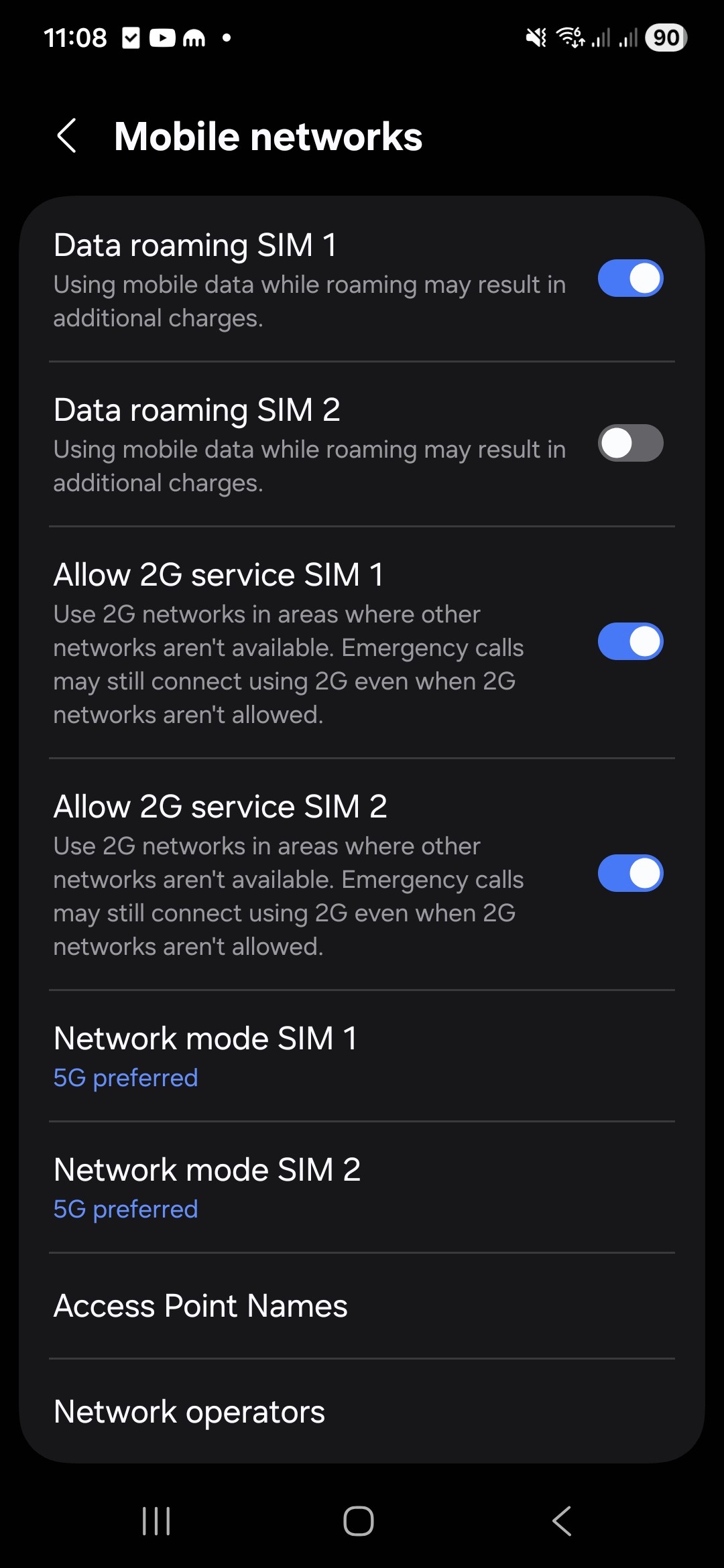
Settings → Network & Internet (or Connections) → Mobile Network → Data Roaming (toggle)
If you use dual SIM (physical SIM + eSIM), make sure you’re toggling roaming for the correct line.
How to avoid roaming charges (without going off-grid)
Here’s the practical “travel-smart” checklist:
1) Choose your travel connectivity plan before you fly
You’ll usually pick one of these approaches:
A roaming pass/bundle from your provider
A travel eSIM plan
A local SIM
A pocket Wi-Fi device
Wi-Fi only
2) Stop background data from doing its own thing
Before traveling:
Turn off automatic app updates on mobile data
Pause cloud photo backups on mobile data
Enable Low Data Mode / Data Saver
Disable auto-play videos on social apps
Download maps and media for offline use
3) Use airplane mode like a pro
Airplane mode stops cellular connections. You can then turn Wi-Fi back on manually to stay connected without mobile data.
4) Track your usage
Most phones show data usage by SIM and by period. Checking it once a day while traveling can save you from surprises.
Alternatives to data roaming (how travelers stay online comfortably)
Option A: Wi-Fi (simple, but not always reliable)
Great in hotels/cafés—less great when you’re in a taxi trying to find your dinner reservation.
Option B: Local SIM
Often cost-effective, but requires buying/switching a physical SIM (and keeping your home SIM safe).
Option C: Pocket Wi-Fi
Useful for groups or multiple devices, but it’s another gadget to carry and charge.
Option D: Travel eSIM (modern, fast, no SIM swapping)
A travel eSIM lets you activate a data plan digitally, without changing physical SIM cards.
Virgin Connect Roam is built for exactly this kind of travel scenario—helping you get online abroad with a travel eSIM approach so you can use maps, messaging, and travel apps without relying on unpredictable Wi-Fi or risking pay-per-MB roaming surprises.
(If your phone supports eSIM, this is one of the cleanest “arrive and connect” experiences.)
Common questions (FAQs)
Is data roaming the same as calling and texting while abroad?
Not exactly. “Data roaming” specifically refers to internet data. Calls and texts may be charged differently depending on your plan.
Why did I get roaming even though I barely used my phone?
Because your phone might have used data in the background—syncing, refreshing, updating—especially right after you landed.
Does turning off data roaming stop everything?
No. It stops mobile data on partner networks, but you can still:
Use Wi-Fi
Make emergency calls (varies by region/device rules)
Use your phone offline
Can I use maps without roaming?
Yes—download offline maps before you travel. Then you can navigate without using mobile data (GPS still works without data).
The bottom line
Data roaming is incredibly useful. It’s also one of those features that works so smoothly you can forget it’s even happening—until you see the bill.
If you want a stress-free approach:
Keep roaming off unless you’ve planned for it
Control background data
Use Wi-Fi strategically
Consider a travel eSIM option like Virgin Connect Roam to stay connected abroad in a way that’s built for travelers
About Me

your travel companion for destination tips and eSIM guides—helping you roam smarter and stay seamlessly connected worldwide
Trending Post


Stay up-to-date
Related Post
Roaming bills are broken, and summer makes it worse. Here's why 301K people searched "eSIM vs roaming" last month, and how to travel connected for less this summer.
Trying to install a travel eSIM but the QR code will not scan? Here are the most common reasons it happens and the quick fixes that usually solve it.
Travel eSIM vs roaming: which is cheaper, easier and better for travel? Compare roaming fees, setup, speed and flexibility before your next trip.
Traveling to Turkey and not sure whether to get an eSIM or a local SIM card? Here’s the simple comparison on setup, price, convenience, and what works best for most travelers.